

This is a solid release with many substantial updates. To explain the improvements, I categorized the changes by functional area (Core/Global, Viewer, Archive Management, etc.) so you can quickly find what interests you.
New Features

- Core & UI
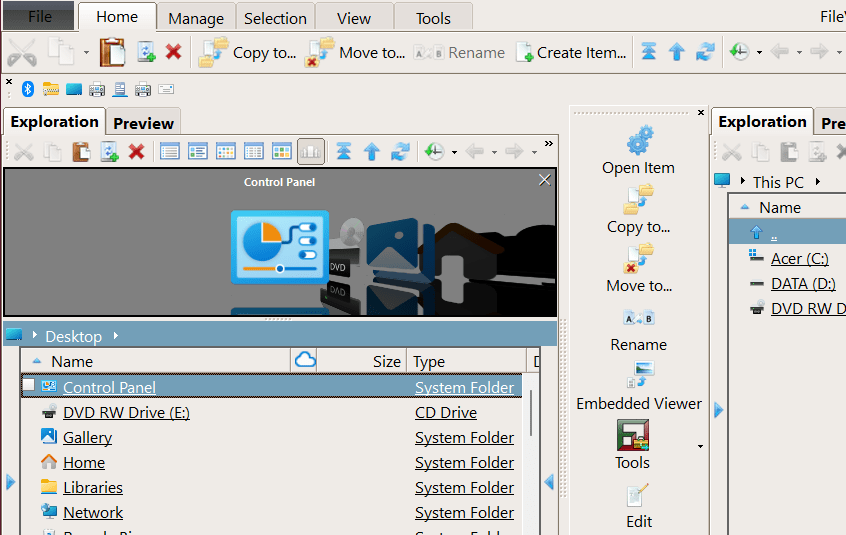
- Accessibility: Added support for scaled fonts (respects Windows Accessibility font settings that are decoupled from DPI scaling).
- Persistence: Settings now save immediately upon change to prevent data loss in the event of a crash.
- Mask Management: Introduced a uniform mask management system with predefined file groups (e.g., Images, Videos).
- Localization: Added Korean translation (LLM translated).
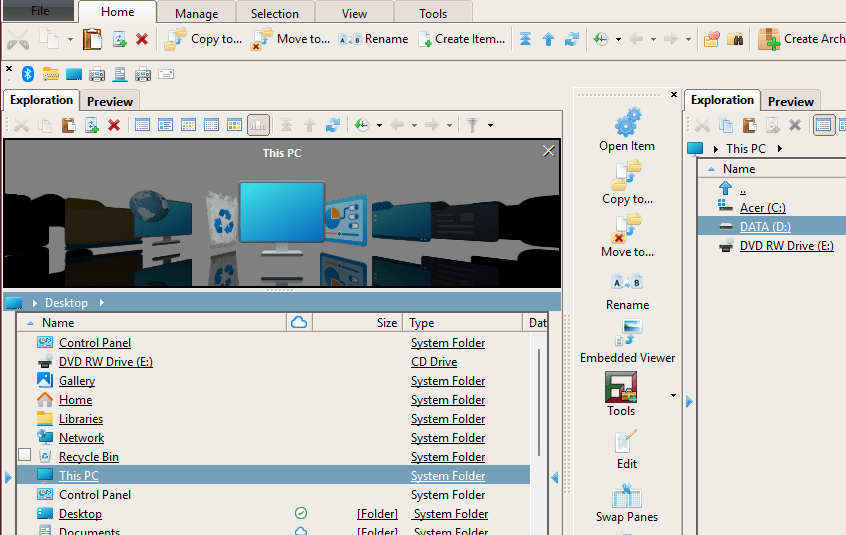
Below: FileVoyager in a 135% text size environment.
- Viewer (Multimedia)
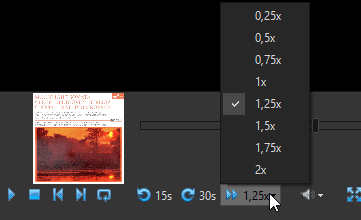
- Playback Control: Added adjustable playback speed.
- Navigation: Added quick-jump buttons (Skip back 15s / Skip forth 30s).
- Metadata: Cover Art support added for Ogg Vorbis, FLAC, Ape, and MP4.
- File Management & Browsing
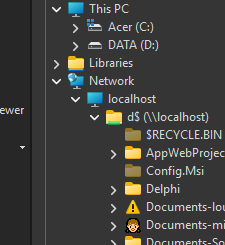
- Network: Tree View now supports displaying network shares via injected browsed paths (UNC support).
- Archives: Added read-only support for a massive range of formats: RAR5, ZStd, VHDX, VMDK, VDI, QCow, GPT, NTFS, FAT, VHD, DOS EXE/SFX, Coff, Ext, and IHex.
Other Improvements & Changes
- UI Optimization: Refined Multimedia Viewer layout to maximize space for control buttons.
- Readability: Complete overhaul of the English translation using LLM for better clarity.
- Compatibility: Improved DWG support to handle recent versions containing PNG previews.
- Under the Hood:
- Updated Delphi libraries and third-party binaries (7zip, Scintilla, and SumatraPDF) to latest stable versions.
- Extensive code refactoring to improve maintainability and performance.
- Miscellaneous minor UI tweaks.
Bug Fixes
- Windows Integration: Fixed “ghost” windows appearing in the Windows Taskbar app preview.
- Browsing: Fixed a bug where the filter button would sometimes affect the wrong list panel.
- Archive Handling: * Fixed an issue where temporary files remained after viewing items inside an archive.
- Restored broken support for multi-volume archives.
- General: Various minor bug fixes and stability improvements.
As always, thank you for using FileVoyager and for the feedback that helps shape each new version – it’s instrumental in helping me refine and enhance FileVoyager! Download the latest update, and feel free to share your experience with us.
And don’t forget, if you like FileVoyager and want to contribute to its development:
- You can help by buying me a coffee



 , because I work on it late at night
 - You can help by creating, maintaining or correcting translation files. Head to this article, your help will be welcome.
- You can help by creating, maintaining or correcting tutorials in the forum
- You can help by liking, following or talking about FileVoyager in social networks, or in blog posts, or in articles.
- You can help by reporting bugs or wrong behaviors.
- You can help by requesting features.
- You can help by participating in the forum.
- Or you can still help by buying me a coffee , because I still work on it late at night
And if none of the above suits you, just use FileVoyager and if you enjoy it, I am rewarded.
You must be logged in to post a comment.