

Welcome › Forums › Issues and bugs reports › Network share UNC
- This topic has 0 replies, 2 voices, and was last updated 6 months, 1 week ago by
HomeBoy TAZ.
-
AuthorPosts
-
17th April 2026 at 3:08 pm #8692Participant
If a path is typed, for instance \\srv-share\c$\windows\temp, the application goes in the path then the application goes at the root of network. Then, the use of the back arrow permits to go to the entered path.
Moreover, the left tree does not reflect the network path browsed, it stays at the network root
For performance issues, I am not sure all accessed pathes should be kept in the tree, especially when the network path is no more accessible (destination computer powered off for example).
19th April 2026 at 6:56 pm #8698FileVoyager (Author)
KeymasterHi HomeBoy,
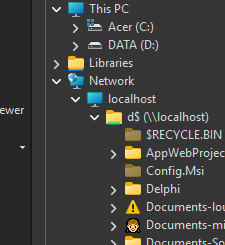
The reason of the symptoms you described is that the Tree doesn’t show the hierarchy for ‘non-shell’ items like the \\ServerName\…
After your message and checking the reasons, I decided to proceed like File Explorer and thus, to ‘inject’ non-shell nodes until the shell takes over again.
Was needed for the \\ServerName\ and the for the root drive \c$\ or any other root. After that, the shell takes over again.
This is what it looks to on my Dev version:
 19th April 2026 at 6:57 pm #8699Keymaster
This improvement will be part of the next release (End April 2026)
20th April 2026 at 8:38 pm #8702ParticipantI am not sure I got everything in your explanation, but thanks and great to know it will already part of new release and see that new release will come so early.
This answer raises one question, so far I have not tested it yet, but are you handling very long pathes and names? As far as I remember, you can do it by handling all pathes with specific syntax like \\?\C:\ for a drive letter (C:\ in this example) or \\?\UNC\server\share for a network drive (\\server\share in this example).
I am not sure how far it affects this thread specifically or the whole program in general.20th April 2026 at 9:57 pm #8704KeymasterHi HomeBoy,
I recently improved support for very long paths in FileVoyager. There may still be cases that are not handled properly, but in most situations this is due to limitations of Windows itself. File Explorer exhibits the same issues for the same reasons.
Regarding the specific case in this Topic, I tested using extremely long paths created for stress testing, and everything worked correctly.
The key point is that FileVoyager does not rely on plain text paths. Instead, it uses Item ID Lists (aka PIDLs), which are binary structures used by the Windows Shell to identify objects.
A PIDL represents a path as a sequence of linked identifiers rather than a single string. Because of this, it avoids many of the traditional MAX_PATH limitations associated with text-based paths. In practice, PIDLs allow handling much longer paths than standard string-based approaches.
22nd April 2026 at 8:03 am #8710ParticipantI had no idea it exists. Do you know if in terms of performance handling pathes and objects by such IDs is faster than pathes? Just for my knowledge because here the question is long pathes, even if I think FileVoyager is already quite reactive (maybe on network shares it can be slow, but I am not sure it comes from the application itself)
24th April 2026 at 5:35 pm #8718KeymasterPIDLs are generally faster than string paths, and they also provide capabilities that paths simply don’t. In particular, PIDLs allow navigation within the Windows Shell namespace (e.g., Desktop, This PC, Libraries), which aren’t always backed by real filesystem paths. String paths, by contrast, are limited to actual files and folders.
Regarding the slowdown when browsing network locations, this appears to be related to how Windows handles network discovery rather than anything specific to FileVoyager.
For example, navigating directly to a UNC path (like \\server\share) without opening the tree view is typically very fast. However, when the tree view is opened for the first time, FileVoyager asks the system to enumerate all network locations. At that point, Windows may trigger network discovery and attempt to enumerate available resources, which can take noticeable time (around 10-15 seconds in my tests).
This delay seems to come from the operating system’s network enumeration process, not from FileVoyager itself. In more controlled environments, such as professional networks with properly configured discovery or mapped resources, this slowdown is usually not observed.
30th April 2026 at 1:36 pm #8809ParticipantI am now using 26.4.26.1, I entered a \\server\share\path1\path2\path3 and it opened my path and right after switch back to \\server\share\ (more or less the same issue). When I browse back and/or go into another sub-folder, it does not reflect on the left tree
Note : I have tried that only once, I am not yet sure it happens all the time
-
AuthorPosts
- You must be logged in to reply to this topic.