
Forum Replies Created
-
AuthorPosts
-
FileVoyager (Author)
KeymasterHi Allen,
Have seen your last post. Good thing that you have a workaround with the 32 bit version.
Now that the 32 bit has started and created a working ini file, can you try to restart the 64 bit.
64 bit will rely on the same ini file, and maybe will startup correctly.
Unfortunately, I do not have a Server 2025 (and no Server version in general) to test FileVoyager.KeymasterHalo Daniël,
Op deze pagina, vind u de verschillende versies
Keymastercrap!
Het is beter om terug te keren naar versie FileVoyager250914_Beta.zip. Deze laatste versie is helemaal niet goed. Ik moet dit verder onderzoeken.
De laatste dagen besteed ik hier vele uren aan zonder de oorzaak te vinden, wat erg frustrerend is 🙁KeymasterInderdaad… Ik heb de zip nu gecorrigeerd.
FileVoyager250920_Beta_FullDebug2.zip.
Helaas, bij mij wordt het bestand geblokkeerd door mijn antivirus (Defender) wanneer ik het download om te testen, omdat er ten onrechte een virus wordt gedetecteerd…
Ik weet niet of het bij jullie wel zal werken.KeymasterAh! Alles loopt mis en dat is mijn fout. Wanneer je in Full Debug-modus compileert, moet je samen met het exe-bestand ook de dll FastMM_FullDebugMode meeleveren, en dat was ik vergeten.
Hier is het pakket met de exe en de debug-dll: FileVoyager250920_Beta_FullDebug.zip.
De dll moet zich in dezelfde map bevinden als FileVoyager.exe.KeymasterHeel erg bedankt! Dankzij deze feedback en de screenshot komen we steeds dichter bij de fout.
Ik ben erin geslaagd een fout te forceren op de enige plaats die hetzelfde resultaat geeft als in uw afbeelding.Het gaat om een heel eenvoudige regel code, dus ik begrijp nog steeds niet goed waarom dit een probleem zou veroorzaken. Ik vermoed eerder een geheugencorruptie door een instructie die ergens anders zit ;(
Voor die regel heb ik nu een specifieke foutafhandeling toegevoegd, zodat ze de rest niet blokkeert.
Maar eerlijk gezegd denk ik dat deze crash eerder het gevolg is van een onderliggend probleem dat elders zit.Hierbij plaats ik een versie die robuuster zou moeten zijn voor uw probleem. Het bestand is groter omdat dit een Debug-build is. Als er een geheugencorruptie wordt gedetecteerd, verschijnt er een FastMM-foutmelding: FileVoyager250920_Beta.zip.
Ik ben benieuwd om een screenshot van hetzelfde paneel met deze versie te zien.
KeymasterHallo ruitertepaard,
Heel erg bedankt voor je positieve feedback én voor je donatie. Dat waardeer ik enorm!
Wat betreft je vraag: bij het opstarten initialiseert FileVoyager verschillende componenten. Als er in één van die stappen iets misgaat, kan dat leiden tot een crash. In de nieuwe versie wordt die mogelijk fout beter opgevangen, waardoor FileVoyager niet meteen volledig crasht.
Maar eerlijk gezegd is het moeilijk exact te zeggen welk onderdeel bij jou de oorzaak was.Om zeker te zijn dat alles correct werkt, zou je het volgende kunnen nakijken:
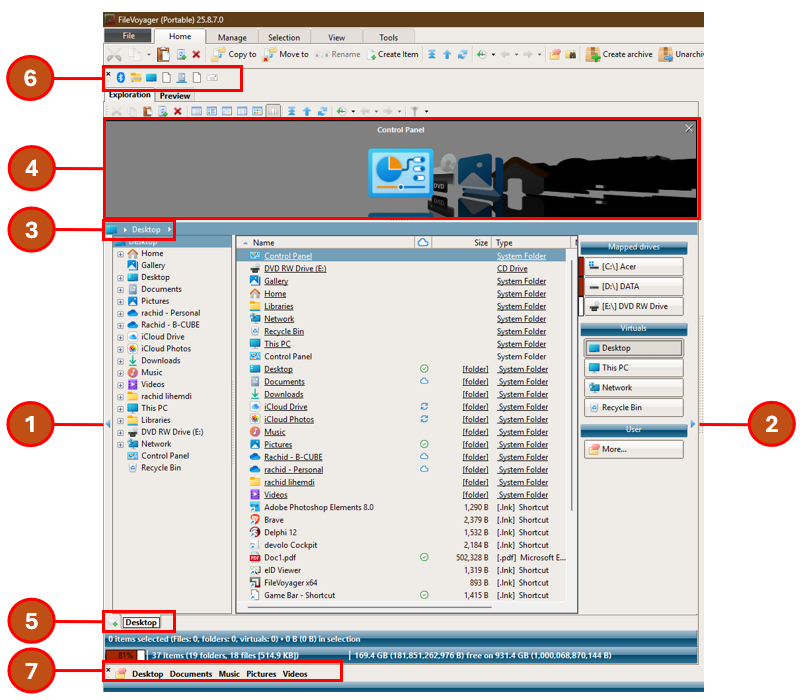
- Treeview: wordt deze correct gevuld met de mappen?
- Drive panel: verschijnen daar de knoppen voor de schijven (C:, D:, enz.), maar ook voor Bureau, Deze PC, Netwerk, Prullenbak en de knop More om de Favorieten te beheren?
- Crumb bar: kan je hiermee correct door de mappen navigeren?
- ThumbFlow: kan je hiermee correct door de items navigeren?
- Tabfolders: zijn de tabbladen aanwezig en bruikbaar?
- Appbar: wordt deze gevuld met standaardtoepassingen (dezelfde als in “Send To” in het Windows contextmenu)?
- Favorieten: zijn er een paar standaard favorieten zichtbaar?
- Instellingen & voorkeuren: na een herstart van FileVoyager, worden je voorkeuren correct hersteld?
In de onderstaande schets zie je waar je al deze elementen in de interface kunt terugvinden. Zo kan je stap voor stap nagaan of alles aanwezig is en correct functioneert.
Nogmaals heel veel dank voor je steun en donatie. Dat geeft me echt motivatie om FileVoyager verder te verbeteren!
mvg,
 Keymaster
Allereerst wil ik u hartelijk bedanken voor uw geduld en voor de waardevolle hulp die u mij geeft.
Ik heb enkele aanpassingen gedaan in de manier waarop bepaalde fouten worden afgehandeld, ook al is het mij nog niet gelukt om het specifieke geval bij u te achterhalen dat deze crash veroorzaakt.
Zou u zo vriendelijk willen zijn dit opnieuw te testen?
U hoeft hiervoor alleen het bestand FileVoyager.exe in uw map te vervangen door het exemplaar dat in dit zip-bestand staat: FileVoyager250914_Beta.zipKeymasterSorry voor het ongemak.
Ik heb een INI-bestand voor u klaargemaakt dat:- de 3D-weergave van pictogrammen uitschakelt
- FileVoyager rechts op het Bureaublad laat starten
- en links in Deze PC opent
Zou u dit bestand willen plaatsen in de map ini, die zich bevindt in de map FileVoyager Portable (hopelijk nog steeds in uw downloadmap)?
Als er al een FileVoyager.ini aanwezig is, kunt u dat bestand gerust verwijderen.Zodra het nieuwe bestand in de map staat, kunt u FileVoyager.exe starten vanuit de bovenliggende map. Laat u me daarna weten wat er gebeurt?
Hier is de link naar het ZIP-bestand dat het INI-bestand bevat: FileVoyagerSafeIni.zip
KeymasterIk bevestig dat ik, wonend in Brussel, ook Nederlands spreek en schrijf.
Wat betreft de vertaling: de namen van mappen, zelfs virtuele zoals het Bureaublad/Desktop, worden beheerd door Windows zelf en niet door FileVoyager. FileVoyager toont dus enkel wat het systeem doorgeeft.
Uit de tests die u zelf heeft uitgevoerd blijkt duidelijk dat er op uw machine iets gebeurt dat FileVoyager doet crashen.
Mag ik u vragen te proberen, ondanks de huidige fout, of u nog naar andere mappen kan navigeren? Bijvoorbeeld door beide vensters op *D:* te plaatsen. Als dat lukt, sluit FileVoyager daarna volledig af en open het opnieuw om te zien of het probleem zich opnieuw voordoet.
Mvg,
KeymasterHi,
“Bureaublad” is just the Dutch name for Desktop. Windows manages these localized names, not FileVoyager (same for This PC, Control Panel, Network, etc.).
From your screenshot, I see you’re using the Portable version of FileVoyager. Portable apps must be stored in folders where they have full read/write access. Avoid C:\Program Files or C:\Windows.
The empty Favorites bar, empty AppBar, and broken theme suggest FileVoyager cannot load its settings at startup.
Please try the following:
- Move FileVoyager to a non-protected folder.
- If that doesn’t help, delete the Ini folder inside FileVoyager Portable (this resets settings).
- If the issue persists, I recomend to install the Setup version, which handles read/write locations automatically.
Let me know if this helps!
mvg,
KeymasterHi ruitertepaard,
unfortunately, this error message is unusable… It only shows an unmanaged memory access violation.
Could you let me know if this happens only in the Desktop folder, or elsewhere as well?
Also, could you describe how you select the items (checkbox, Shift or Ctrl + click, right-click and drag, space bar, etc.)?KeymasterHi,
A complete review of the shorcuts is planned. Good that you suggest this because shortcuts for column sorting were not in my radar yet. I add it to my todo.
I propose the following shortcuts to stay consistent with other notable file managers:
CTRL+F3 Sort by name
CTRL+F4 Sort by extension/file type
CTRL+F5 Sort by modified date/time
CTRL+F6 Sort by sizeKeymasterHi!
- I’ll consider your remark about the size of the prefs window
- Regarding the listing of files and folders regardless of their type, I’ve added it to my to do list as it shouldn’t be hard to implement
will keep you posted here
KeymasterHi,
I finally managed to fix this issue in version 24.11.1. The reactivation of a minimized FileVoyager is now smoother
-
AuthorPosts
You must be logged in to post a comment.